
How to file a CT600 yourself: step-by-step guide
File your first CT600 yourself, step by step (UK, 2026)
Prerequisites at a glance
- Difficulty
- Intermediate
- Tools you'll use
-
- Government Gateway login (enrolled for Corporation Tax)
- Commercial CT600 filing software
- Have ready
-
- Company UTR
- Company registration number (CRN)
- Accounting period dates
- Reconciled bookkeeping and accounts figures
- Previous accounts and tax records if applicable
- Tax adjustment records
- Corporation Tax payment reference
In short: You can file a CT600 yourself without an accountant. For most UK limited companies, this means using commercial software to send HMRC the CT600, accounts and tax computation, with the accounts and computation in iXBRL. You remain responsible for the figures. Filing the return, paying Corporation Tax and filing Companies House accounts are separate tasks (HMRC: Company Tax Returns).
HMRC's former joint online filing service closed on 31 March 2026. From 1 April 2026, companies generally need commercial software for the Company Tax Return; the company's HMRC online account still matters for access, references and tax records (HMRC: filing after the service closure).
This guide follows the whole job: gather the records, check the period, prepare the documents, review the tax, submit and retain confirmation. The screenshots are a demo company, not a customer case study. Before entering figures, check whether Taxley supports your company's return.
Can I file a CT600 myself?
Yes. You can prepare and submit your company's own CT600; using an accountant is not compulsory. For an ordinary online filing, you need more than a completed form: the return includes supporting accounts, a tax computation and any supplementary pages that apply. Software handles the submission format, but it cannot make incomplete records accurate.
Think of the submission as three connected parts:
- CT600 and relevant supplementary pages: the company's details, period, income, reliefs and tax figures.
- Statutory accounts: the full accounts required for HMRC, not just a reduced public copy from Companies House.
- Tax computation: the calculation explaining how the accounts lead to the taxable profits and tax reported.
HMRC explains the contents of a Company Tax Return and the iXBRL requirements. A spreadsheet or PDF alone is not the normal online filing package. Paper filing is limited to exceptions such as a reasonable excuse or filing in Welsh; check the applicable HMRC rules rather than assuming it is an alternative to buying software.
If you are choosing a product, check that it prepares the accounts and computation as well as submits them. Some products require files prepared elsewhere. Our CT600 software selection guide covers that distinction; what a CT600 is explains the return itself.
What do I need to file a CT600?
Gather your company identifiers, activated HMRC access, accounting dates, reconciled records and tax adjustments before starting the CT600. You need enough information to prepare complete accounts and a computation, not just turnover and a bank balance. Keep the company's UTR, Government Gateway login and payment reference separate: each serves a different purpose.
| What to gather | Where to check | Filing check |
|---|---|---|
| Company UTR: 10 digits | HMRC Corporation Tax correspondence or HMRC's UTR guidance | Use the company's UTR, not a director's personal UTR |
| Government Gateway user ID and password | The company's business tax account, with Corporation Tax enrolled and activated | A login for another tax service is not enough |
| Company registration number (CRN) | Incorporation certificate or the Companies House register | Match the legal company name and number |
| Period start and end dates | HMRC records, notice to file and the accounts | Check first-year or changed-year-end periods separately |
| Bookkeeping and accounts figures | Reconciled bank records, sales, expenses, assets, debts, payroll and year-end adjustments | Prepare both the profit and loss account and balance sheet, with required notes |
| Previous accounts, CT600 and computation, if applicable | Your own retained filing pack and tax records | Check comparatives, opening balances and losses carried forward |
| Tax adjustment evidence | Expense details, fixed-asset records, loss schedules and other claim records | Support each adjustment or relief; do not assume accounting profit equals taxable profit |
| Commercial filing software | The provider's current scope and document requirements | Confirm it supports your accounting period, accounts framework and relevant claims |
| Corporation Tax payment reference: 17 characters | The HMRC payment notice or online account for that period | Use it for payment, not in place of the UTR |
Activate access early. Follow HMRC's instructions for adding Corporation Tax to your business tax account. HMRC says activation codes normally arrive by post within 10 days, or 21 days abroad. Having a Government Gateway login is not the same as having activated Corporation Tax access.
The Companies House register is not a source of your previous CT600 or tax computation, and publicly filed accounts may omit information needed for the next return. Use your complete retained records. A Companies House authentication code is also separate from HMRC credentials; it is needed for the Companies House filing route, not as the CT600 login. See the full filing-day checklist.
How do you file a CT600, step by step?
Follow these seven steps to prepare, submit and check your Company Tax Return. Schedule the payment and Companies House accounts deadlines at the start: they can arrive before the CT600 filing deadline. The sequence below is a workflow, not permission to delay paying tax until after you have submitted the return.
Step 1: Confirm your accounting period and deadlines
Check the Corporation Tax period against HMRC's records before entering figures. The usual return deadline is 12 months after that period ends; most small companies pay Corporation Tax nine months and one day after it ends. Companies House accounts have a separate deadline. Larger companies may have to pay tax by instalments.
Which deadlines apply to this example?
Example: a subsequent 12-month year ending 30 June 2026. Assume a private company with matching accounts and Corporation Tax periods, no special filing extension or late-issued notice, and no instalment-payment requirement.
| Obligation | Deadline in this example |
|---|---|
| Companies House annual accounts | 31 March 2027 |
| Corporation Tax payment to HMRC | 1 April 2027 |
| Company Tax Return to HMRC | 30 June 2027 |
These dates apply the ordinary accounts and return deadlines and Corporation Tax payment rules. Use the deadline guide for the distinctions, and allow for the payment method's clearing time.
A Corporation Tax accounting period cannot exceed 12 months. First accounts covering more than 12 months may need two CT600 returns, depending on when the company became active for Corporation Tax, with separate tax-payment dates. Do not split the accounts simply because incorporation was more than a year ago: check HMRC's first accounts and return guidance. Long periods of account and late-issued notices can change the statutory filing date (HMRC: filing-date rules).
Step 2: Prepare your statutory accounts as iXBRL
Prepare the accounts from reconciled bookkeeping, including year-end adjustments and the required notes. Eligible micro-entities can choose FRS 105; eligible small companies can use FRS 102 Section 1A instead. Use software that produces the appropriate iXBRL accounts, then review the human-readable document as well as any validation results.
Which framework and figures should you check?
FRS 105 is optional for eligible entities, not a rule that every small company must use it. Our FRS 105 versus FRS 102 guide explains the choice, and micro-entity accounts contents covers the statements and notes.
Finalising the accounts and calculating tax are connected: after step 3, check that the accounts include the correct tax charge and any outstanding tax liability before final approval. A format check does not confirm that all transactions or disclosures are correct.
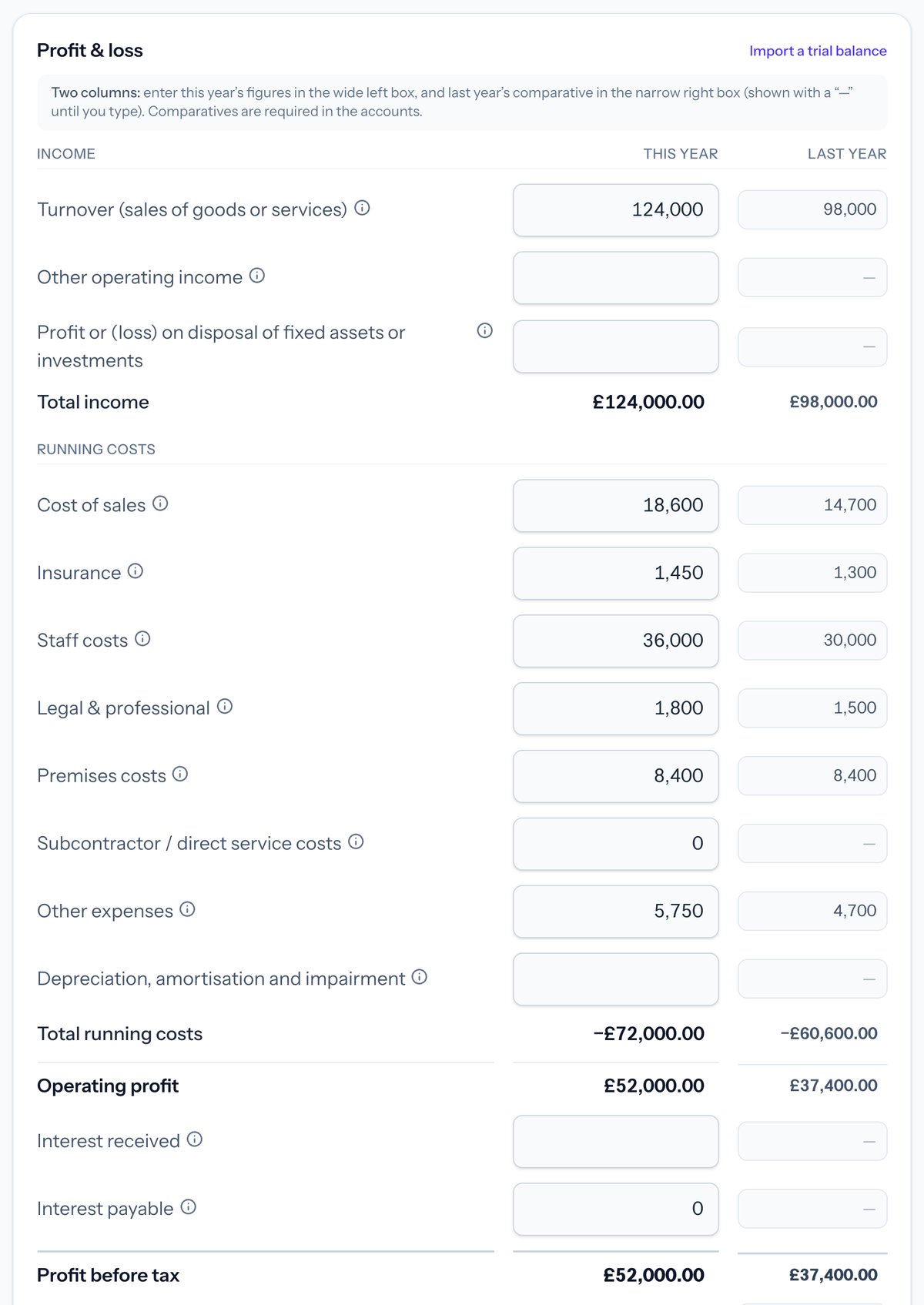 In Taxley: enter the profit and loss figures and applicable comparatives (demo company). These are not your own filing figures.
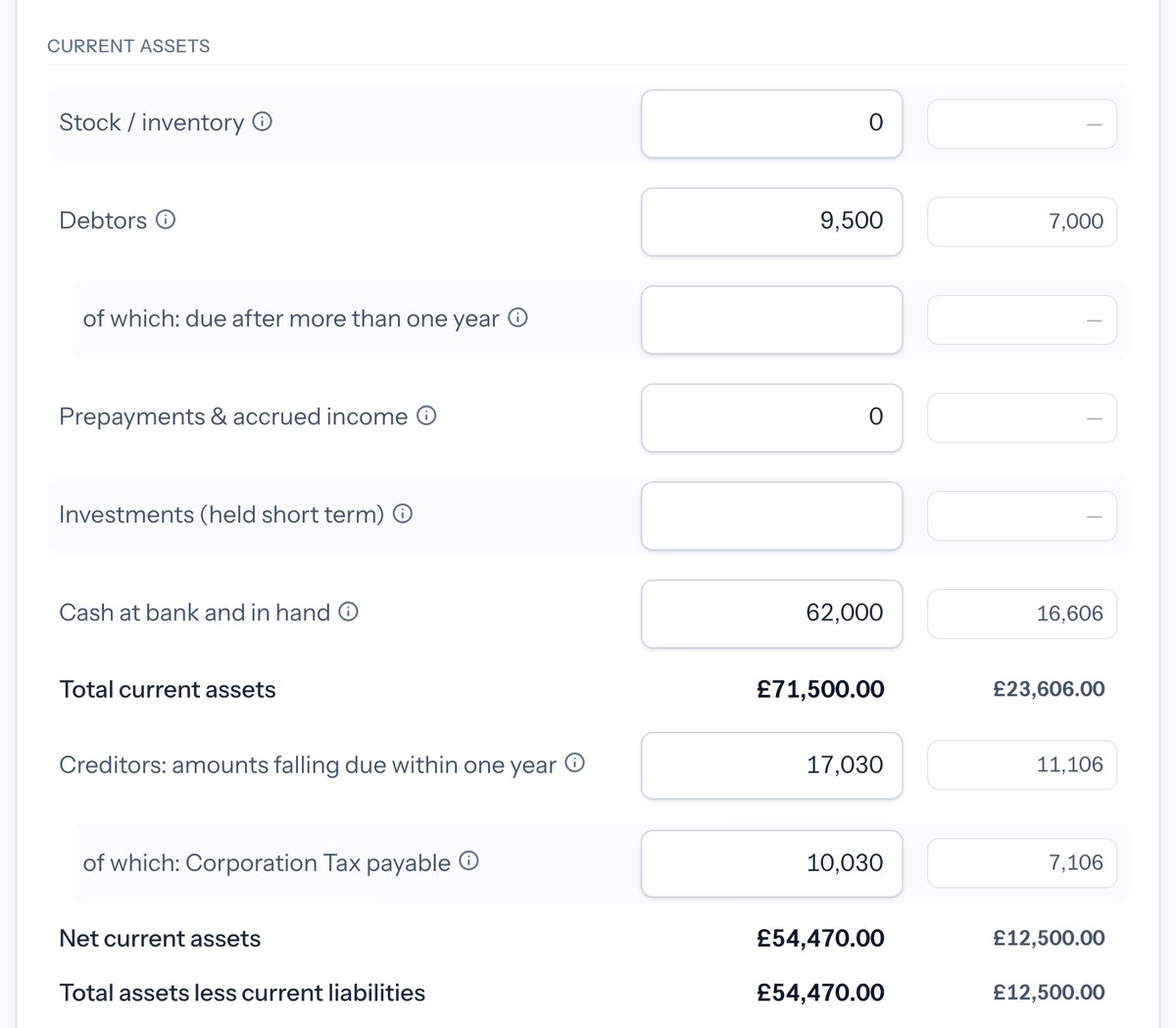 In Taxley: the balance sheet includes £10,030 of Corporation Tax payable (demo company). Your liability depends on your own computation and any tax already paid.
Step 3: Work out the Corporation Tax
Start with the accounts and identify the adjustments needed to reach taxable profits. Review disallowed expenses, capital allowances, other income and gains, and any losses or reliefs claimed. Then check the applicable Corporation Tax rate and marginal relief. Applying a percentage directly to accounting profit can give the wrong answer.
For example, client entertaining is normally disallowed, while qualifying equipment may receive capital allowances. Keep the explanation and records behind each adjustment.
What rates apply, and how does the example work?
Under the standard rules, eligible companies pay 19% at or below the small-profits limit and 25% above the upper limit, with marginal relief between them. The normal £50,000 and £250,000 limits reduce for short periods and associated companies. Augmented profits, which can include certain exempt distributions, affect the limits and relief; not every company qualifies (HMRC: marginal relief).
Worked illustration matching the screenshots: assume a UK-resident trading company eligible for marginal relief, a 12-month period wholly under the current rates, no associated companies, and both taxable total profits and augmented profits of £52,000. There are no further reliefs, credits or additional tax charges in this illustration.
| Calculation | Amount |
|---|---|
| Tax before marginal relief: £52,000 × 25% | £13,000 |
| Marginal relief: (£250,000 − £52,000) × 3/200 × (£52,000 / £52,000) | £2,970 |
| Corporation Tax: £13,000 − £2,970 | £10,030 |
The calculation uses HMRC's marginal-relief formula. The demo's accounting and taxable profits happen to match; yours may not. The rates and marginal relief guide explains the inputs, and the Corporation Tax calculator provides an illustrative cross-check.
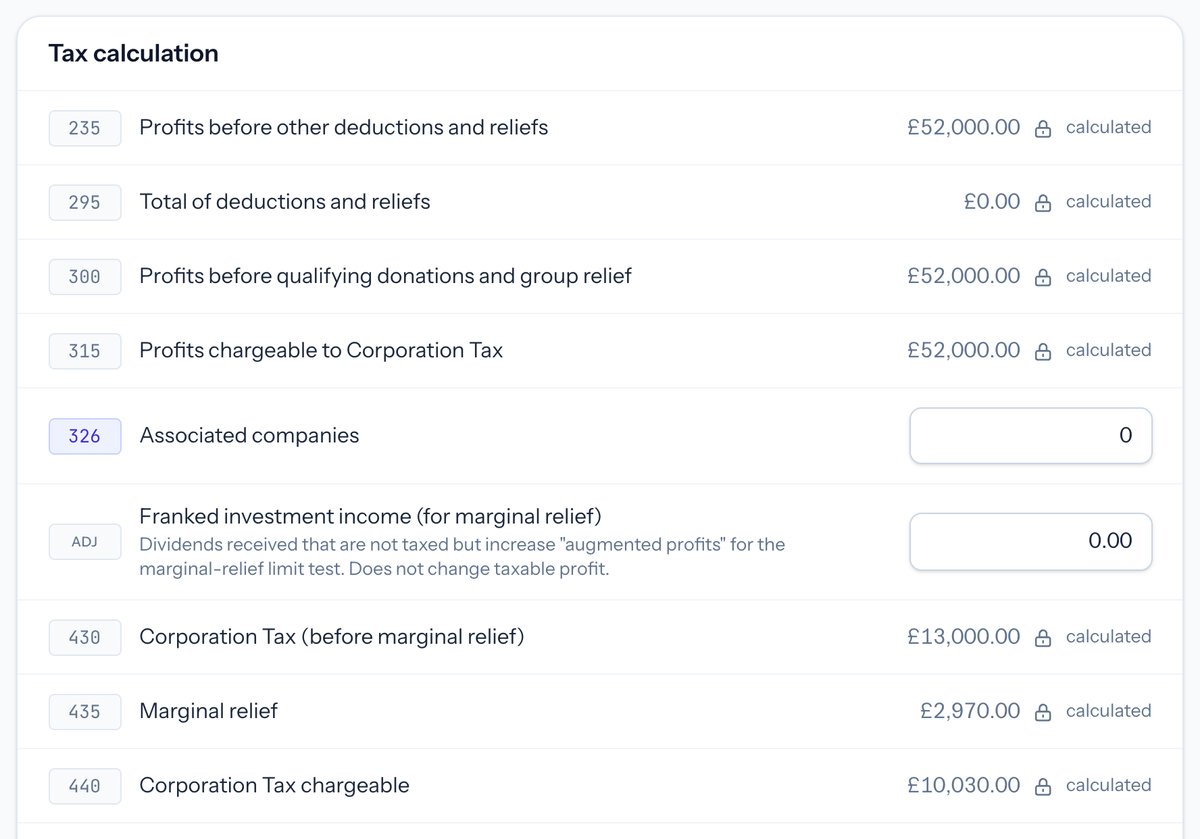 In Taxley: the CT600 shows £13,000 before relief, £2,970 marginal relief and £10,030 Corporation Tax (demo company). The assumptions above explain this example.
Step 4: Complete the CT600 form
Review the company details, accounting period, income, reliefs and tax figures in the CT600. Include any supplementary pages required for the company's circumstances, and the accounts and computation. The person making the return must complete the declaration that it is correct and complete to the best of their knowledge and belief.
The declaration fields are box 975: name, box 980: date, and box 985: status, such as director. They are not three tax-calculation boxes (HMRC: completing the CT600).
What should you check before declaring?
Before declaring, check:
- The company name, CRN, UTR and period agree across the return and attachments.
- Turnover, profits and tax reconcile to the accounts and computation, with differences explained.
- Claims and supplementary pages reflect the company's actual circumstances.
- The documents are the final versions for this filing, with the required accounts approval and comparative information.
- Any software warnings have been resolved, not merely bypassed.
Our common CT600 mistakes checklist covers further filing checks.
Step 5: Submit to HMRC through the Government Gateway
Use your filing software to send the completed return with the correct Government Gateway user ID and password for the company's Corporation Tax service. Check the result of that submission. A confirmed rejection needs correction; a pending or unknown response needs a status check before you attempt to send the same return again.
For an authentication rejection such as error 1046, verify the login and Corporation Tax enrolment before retrying; see how to resolve HMRC error 1046. Do not repeatedly submit unchanged details. A network timeout does not, by itself, prove HMRC rejected the return.
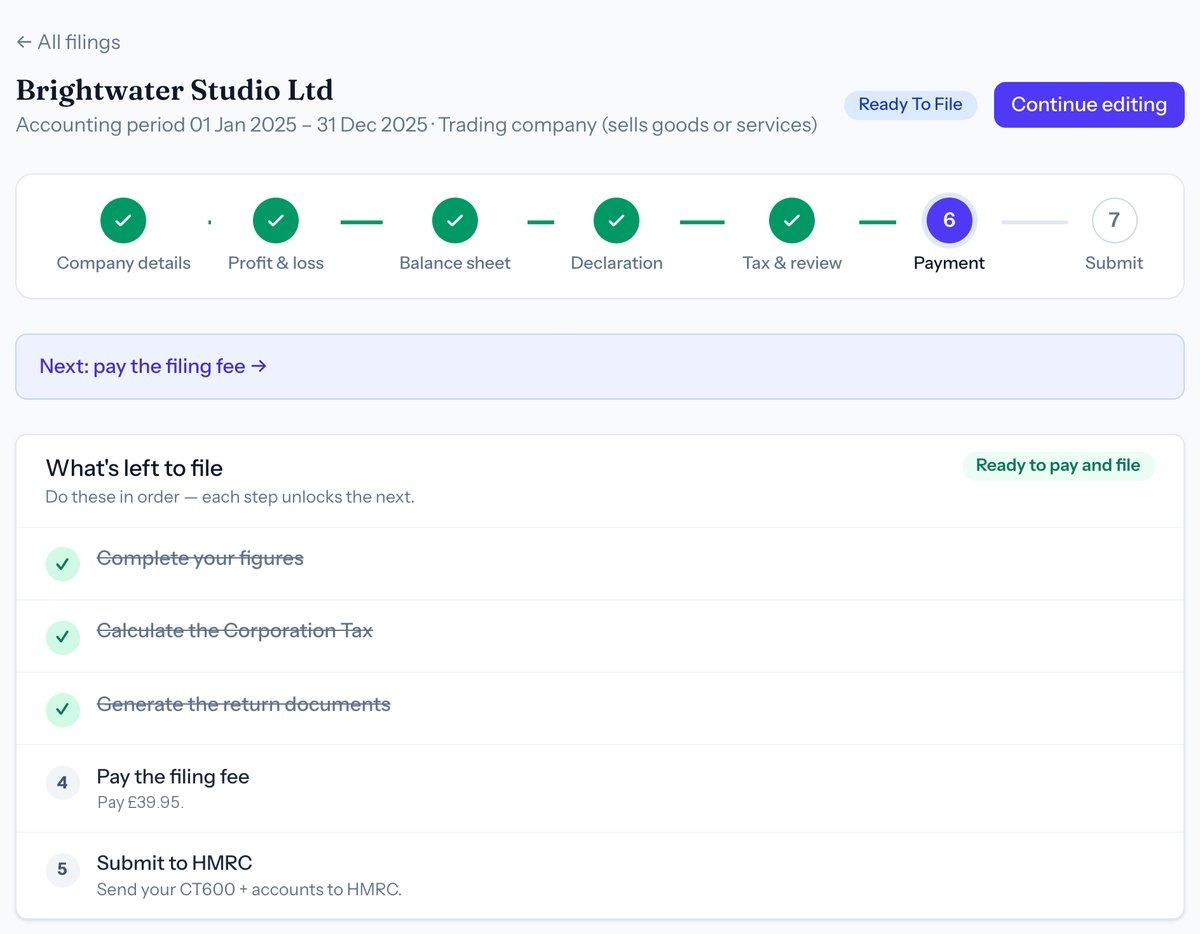 In Taxley: "Ready To File" is a preparation status, not HMRC acceptance (demo company). Paying Taxley's filing fee is also separate from submitting the return and paying the company's tax.
Step 6: Pay the tax and keep your records
Pay Corporation Tax separately to HMRC by the applicable payment deadline, using the 17-character reference for that accounting period. Do not wait for the CT600 filing deadline. Submitting the return or paying a software fee does not pay the company's tax bill; check that the payment reaches HMRC in time. Retain the filed documents and supporting records.
Which payment and record-keeping checks matter?
Follow HMRC's payment instructions, including the correct reference and clearing time. If no tax is due, follow HMRC's nil-payment reporting instructions; telling HMRC there is nothing to pay does not remove an outstanding return obligation.
Retain the filed return, accounts, computation, submission result and supporting records. The normal record-retention period is six years from the end of the last company financial year the records relate to, not simply six years from today. Longer retention can be needed for late returns, an HMRC compliance check, long-lasting assets or transactions spanning periods (HMRC: company and accounting records).
Step 7: Check HMRC accepted your return
Check for HMRC's final submission confirmation and retain it with the return actually sent, including the submission reference and timestamp shown by your software. A saved draft or a payment receipt is not filing confirmation. HMRC's acknowledgment confirms receipt; it does not mean HMRC has agreed the figures or tax treatment.
What does HMRC's confirmation prove?
HMRC can still correct or enquire into the return (HMRC: what happens after submission). If your status remains pending or unknown, use the existing submission's status and support route rather than creating a duplicate. Our guide to confirming HMRC receipt explains what to retain.
Finally, check the Companies House accounts status separately. An HMRC confirmation is not proof that Companies House received the accounts. Keep both confirmations with the company's records.
When should you file a CT600 yourself?
Filing yourself is a practical option when your records are complete, you understand the accounts and tax adjustments, and the software supports every relevant part of the return. Company size alone is not enough: a low-turnover business can still have complex loans, overseas transactions, relief claims or disclosure requirements.
Use these three checks before committing:
- Records: can you explain the bank reconciliation, year-end balances, prior-year comparatives and tax adjustments? Resolve missing or uncertain figures before declaring.
- Scope: does the product support your accounts framework, period and all the claims or supplementary pages you need?
- Review: can you check the generated accounts and computation against your evidence, rather than relying only on a green validation result?
Taxley's current scope excludes R&D tax relief claims and terminal loss claims. Other cases, including certain foreign-income or director-loan arrangements, need a closer scope check. Check your company's fit before preparing a return, and do not omit a transaction or claim simply to get through a software screen. Whether you need an accountant discusses the self-filing decision in more detail.
How does Taxley help you file a CT600?
Taxley is online CT600 software for UK limited companies. It prepares the CT600, the tax computation and supported FRS 105 or FRS 102 Section 1A iXBRL accounts from the figures you enter. It sends the return to HMRC using the company's own Government Gateway sign-in.
Preparing and previewing the return is free. You pay per return when you file, and there is no subscription: £39.95 with micro-entity accounts, £129 with small-company accounts, or £9.50 for a dormant company. The fee covers the supported Companies House accounts filing, but not your Corporation Tax bill. The fees for each type of return are listed in one place. Companies House filing is a separate step after payment, using the company's authentication code. Check both results, because one does not prove the other succeeded.
To see each stage before you start, read how filing a CT600 online with Taxley works. Two worked pages cover a company's first CT600 after incorporation and iXBRL accounts filed with the tax computation. Check whether Taxley fits your return first. Taxley is filing software, not a substitute for complete records.
General information checked against the linked official guidance on 9 October 2026. The examples are illustrations, not a determination of your company's tax liability.
Frequently asked questions
Do I need an accountant to file a CT600?
No. You can prepare and submit your company's own Company Tax Return. You must still provide complete accounts, a tax computation and any relevant supplementary pages, and take responsibility for the declaration and accuracy of the figures.
Can I file a CT600 for free?
HMRC's free joint filing service closed on 31 March 2026. Commercial software is now the normal route, but charges and bundled access vary. Check whether the price includes preparing the accounts and computation as well as submitting the CT600; do not assume all products include the same work.
What happens if I file my CT600 late?
For filing dates on or after 1 April 2026, the initial penalty is £200, followed by another £200 at three months. Tax-related penalties can follow, and repeated failures attract higher fixed charges. HMRC's penalty notes explain the rules; our late-CT600 guide covers the next steps.
Can I file a dormant company's return myself?
Yes, if a return is required. After HMRC is told the company is dormant, another return is generally unnecessary unless HMRC requests one or trading restarts. Do not ignore an outstanding notice. Companies House obligations remain separate (HMRC dormancy guidance). See our dormant-company return guide.
How long does it take to prepare and file a CT600?
There is no reliable fixed time for every company. Preparing accounts, resolving tax adjustments, activating HMRC access and checking submissions can take longer than entering the form. Gather the records and confirm access early; a short software walkthrough is not an estimate for completing your entire year-end.
Does filing a CT600 also file my Companies House accounts?
Not by itself. The CT600 goes to HMRC, while annual accounts go to Companies House. Software may support both, but you must complete each submission and check each result. Taxley's included Companies House filing is a separate action using the company's authentication code.
Video transcript
Read the full transcript of “File your first CT600 yourself, step by step (UK, 2026)” (7:10)
Example company and figures are fictional. General information, not tax advice.
0:00 Intro
In Part 1, we prepared the accounts for Kestrel Lane Holdings, a one-person design company, for its year to 31 March 2026. This part turns them into the Company Tax Return, the CT600: the tax computation, the return itself, filing, and paying the tax.
0:23 Why isn't your profit the same as your taxable profit?
The profit in your company's accounts isn't the figure it pays tax on. Kestrel's accounts show £48,134. First come the add-backs, costs the tax rules don't allow: depreciation, £600, and client entertaining, £400. Then capital allowances come off: £1,800 for the laptop. That leaves a taxable profit of £47,334.
0:54 How does the tax computation work?
Three things change your company's taxable profit, and in Taxley they're all in the Corporation Tax section. It starts from the profit before tax in your accounts: £48,134. One: depreciation is added back automatically, because it's never allowed for tax. Two: disallowable expenses, costs that are fine in your accounts but not for tax. Entertaining clients is the classic one, so Kestrel's £400 goes here. Entertaining your own staff is treated differently and can be allowed.
Don't add depreciation again here; it's already done. Three: capital allowances, the tax relief on equipment, given instead of depreciation. The annual investment allowance lets a company deduct the full cost of equipment such as computers, up to £1 million a year. So Kestrel claims all £1,800 for its laptop, from the purchase invoice. Never claim depreciation as well. Cars, pools and writing-down allowances are claimed in Advanced. The rest is optional. Trading losses are unused tax losses from earlier years, taken from last year's tax computation, not from your accounts.
Balancing charges only apply if the company sold or scrapped equipment it had claimed allowances on. Loan and overdraft interest goes under specialist adjustments, not in other charges. Bank interest the company earned is entered in the accounts, as interest income. None of these apply to Kestrel, so they stay blank. And notice what isn't here: the £30,000 of dividends. They're paid from profit after tax, so they never reduce the tax bill.
So the taxable profit is £47,334, and the Corporation Tax is £8,993.46.
2:51 What rate of Corporation Tax will you pay?
For Kestrel's year, Corporation Tax is 19% on profits up to £50,000, and 25% over £250,000. In between, marginal relief applies, and Taxley works it out. Those limits are shared. An associated company is one that controls yours, or is controlled by it, or by the same people. With one, each limit is halved, and they're cut for periods under twelve months. Kestrel has none, so this stays at zero.
Its taxable profit, £47,334, is under £50,000, so the tax is 19%: £8,993.46.
3:37 What goes on the CT600?
Review and pay builds the CT600, the Company Tax Return form, from what you entered. Check the main figures: the company, with no associated companies; turnover of £68,400; taxable profit of £47,334; and £8,993.46 of tax to pay. If anything's wrong, each card has an Edit link. Most small returns need nothing else. The optional sections are in the Advanced view; here's who uses them.
Loans to directors: if a director still owed the company money at the year end, it's reported on a CT600A, and if it isn't repaid within nine months, the company pays extra tax, which it gets back once the loan is repaid. Detailed capital allowances, for pools and cars.
More tax adjustments, and losses brought forward. Carrying a trading loss back to an earlier year. Gains on selling property, shares or investments. Group relief, for companies in a group sharing losses. Income from abroad. Indicators, such as estimated figures, which most returns leave unticked.
Tax you've already paid. And bank details, if HMRC owes the company a refund. Charitable donations and research and development are on the full CT600 view. Kestrel needs none of them.
5:08 What does HMRC receive with the return?
Taxley also prepares the documents that go with the return, in iXBRL; you can upload an accountant's instead. HMRC gets your full accounts, including the profit and loss account, even though a micro company can still file just its balance sheet at Companies House. HMRC also gets the tax computation. Check both before you file.
5:34 How do you file the return?
Read the declaration, then tick it: you're confirming the return is correct and complete. Then pay Taxley's fee. To file, enter the company's Government Gateway user ID, not your email address, and its password. File. When HMRC accepts it, the status says so. Keep copies of everything.
5:57 When do you pay the tax?
Filing isn't paying. Kestrel's tax is due by 1 January 2027, nine months and a day after its year end, and three months before the return's own deadline of 31 March 2027. Pay with the 17-character payment reference from your HMRC notice or online account.
It changes every period, so copy it; never build it. The accounts must reach Companies House by 31 December 2026. Add the company's authentication code, save, and file them from here. Accepted. Miss a filing deadline and penalties start at £200 from HMRC and £150 from Companies House.
6:43 What should you do next year?
For next year: keep your records for at least six years. Match your cash to the bank statement on the last day. Count every invoice, paid or not. Keep payroll and dividend records. And diary both deadlines. You can try Taxley; the link is in the description.
Update history
- Added deadline example, tax calculation and filing checks; corrected dormant guidance
- What you need to file a CT600 now lists the software
- Clearer scope wording; clarified the 10% and 20% late-filing penalties
Spotted something out of date? See how we handle corrections.
People also ask
Related guides

What is a CT600 and how do you file one?
6 min read →

Common CT600 mistakes when you file it yourself
14 min read →

Free HMRC CT600 filing has closed: what to use now
11 min read →

Corporation Tax for a property (rental) company
14 min read →

Limited company year-end checklist (without an accountant)
15 min read →

Dormant company tax return: when and how to file
12 min read →
Ready to file your Company Tax Return?
Confirm support for your accounting period, accounts and any supplementary pages before paying. Taxley support can answer software questions, not provide a tax opinion.
Questions about your period or accounts? Ask about software support